
HyperFrames Video as Code: How the Render Loop Works
AI Maker Lab’s repository uses HyperFrames, so this evaluation of that dependency is not an independent review. Coding-agent workflow developers often find timing and review decisions hidden in editor state or one-off scripts, which makes agent-produced video harder to inspect, reproduce, and revise.
For repeatable AI Maker Lab (AML) video formats, HyperFrames can be a strong architectural fit. The reason is concrete: an agent edits the same inspectable HTML that the renderer captures. The project documents this HTML authoring and frame-seeking model.
That fit has a firm boundary. HyperFrames is not a replacement for footage-led or live-action editorial. This research reports no measured AML productivity, quality, reach, engagement, demand, or conversion result from HyperFrames.
What HyperFrames is
HyperFrames is an open-source framework for turning HTML, CSS, media, and seekable animations into deterministic MP4 video. A composition is plain HTML. Timing, tracks, and clips live in data attributes, while supported animation code exposes a seekable timeline.
The research snapshot below separates point-in-time observations from evaluation.
| Surface | Observation on 2026-08-25 | Evidence boundary |
|---|---|---|
| Package | The npm registry reported version 0.8.14. | This value can change after the observation date. |
| Repository | The GitHub API reported 42,595 stars, 4,094 forks, and 245 open issues. | Popularity and issue counts do not prove quality, fit, adoption, or performance. |
| License | GitHub and npm reported Apache-2.0. | This is an observation, not legal advice; inspect the current terms for a legal decision. |
| Local requirements | The README lists Node.js 22 or newer and FFmpeg. The npm package also declares Node.js 22 or newer. | The sources do not establish an FFmpeg version or every supported platform. |
The project-maintainer adopter list names HeyGen and tldraw under production uses. It says TanStack is exploring HyperFrames for short-form code demos and documentation. These are self-reported labels, not evidence of scale or outcomes.
How the deterministic render loop works
The renderer controls time instead of watching an animation run. The README’s documented loop has three parts:
- Compose: define the video as HTML with timing and track attributes plus seekable animation code.
- Seek and capture: move headless Chrome to the exact time for each frame, then capture that result.
- Encode: pass the captured frames to FFmpeg for MP4 encoding.
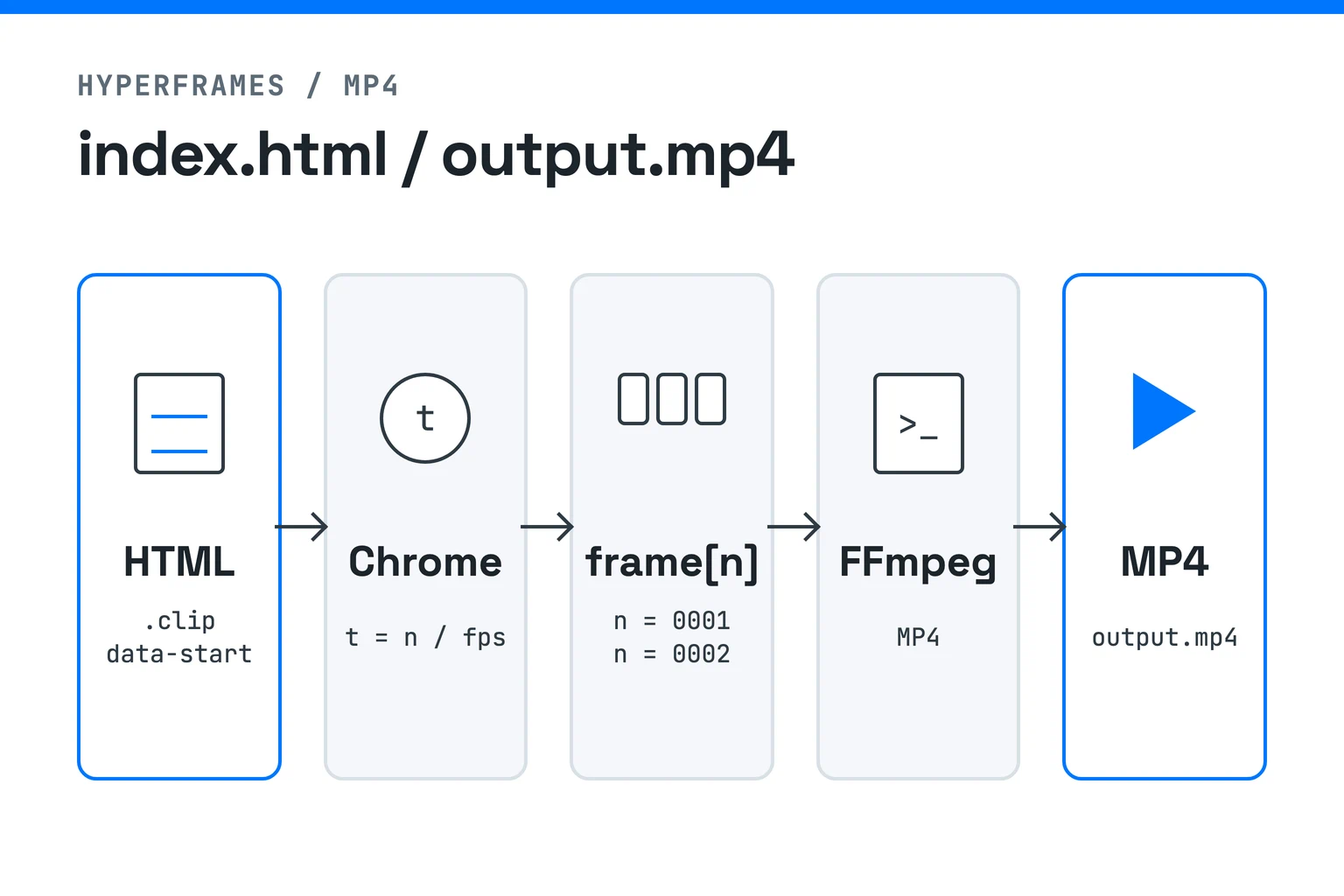
Under the framework’s deterministic contract, the same input produces the same video. That statement has limits. It does not prove bit identity across machines or versions. The project’s comparison guide also requires seek-safe composition rules, including paused timelines, no wall clocks, and no unseeded randomness.
How agent authoring reaches render
HyperFrames gives an agent a source-level production loop rather than an editor-only timeline. The project teaches agents to plan, write valid HTML, wire seekable animation, add media, lint, preview, and render.
A complete conceptual pass looks like this:
- Initialize a project and plan the composition.
- Compose the HTML, timing attributes, tracks, media, and seekable motion.
- Run lint and checks, then inspect the browser preview.
- Render through a documented target and review the result.
The Prompt Guide positions plain HTML, a non-interactive command-line interface, and installable skills as the agent surface. The Catalog packages reusable blocks and components. The project also documents local, Docker, AWS Lambda, HeyGen-hosted cloud, and Google Cloud Run rendering paths in its README and comparison guide.
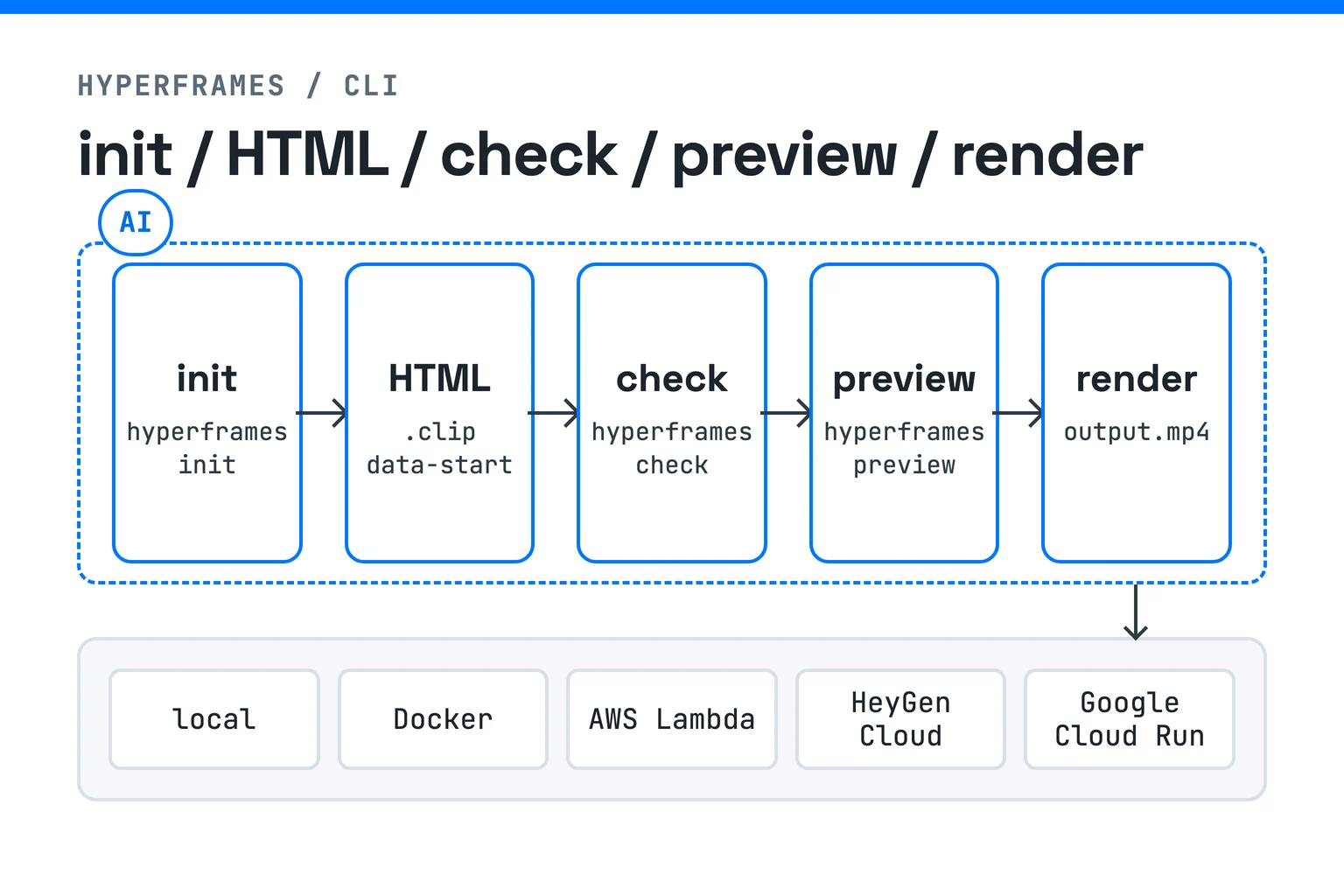
This workflow is project-authored guidance. It does not show that every agent or prompt completes each step correctly. Catalog availability and render paths can also change, and this research makes no cost, latency, or reliability comparison.
Concrete transition patterns, community skills, and working examples
This is a maintainer-and-third-party resource inventory, not outcome evidence. It shows where to inspect documented transition patterns, agent-skill records, finished examples, source projects, and templates; none of these entries establishes usability, quality, performance, productivity, fit, or results.
Transition patterns
The HyperFrames maintainers document two first-class families: shader/WebGL transitions composite scenes per pixel, while CSS transitions animate scene containers with opacity, transforms, clip paths, and filters. They advise choosing one primary transition for most seams plus one or two accents instead of changing the effect at every seam.
In the maintainers’ rendered example, whip-pan appears on four seams and cinematic-zoom on the final pricing reveal. The Catalog provides two source-inspectable rows:
| Example | What the maintainer source exposes |
|---|---|
thermal-distortion | A WebGL shader demo with inspectable source. |
transitions-distortion | A CSS/GSAP showcase with inspectable source. |
These are maintainer examples, not independent quality, performance, suitability, or outcome evidence. Runtime/package and Catalog names are not treated as aliases here.
Community skills
The official skills guide is the baseline for the heygen-com/hyperframes install, update, and check paths. Catalog blocks and components, and init --example starters, are separate artifact types—not community skills.
| Third-party record | Source-transcribed command | Evidence boundary |
|---|---|---|
feicaiclub/hyperframes: forked skill in the skills.sh directory; inspect the GitHub source. | npx skills add https://github.com/feicaiclub/hyperframes --skill hyperframes | Point-in-time third-party availability and repository lineage only. The exact command is transcribed, not recommended. Directory or repository presence does not establish current upstream compatibility, security, quality, upstream endorsement, or outcomes. |
vibe-motion/auto-motion: SRT-to-motion workflow template with a three-concern HyperFrames skill bundle in the skills.sh directory; inspect the GitHub source. | npx skills add https://github.com/vibe-motion/auto-motion --skill hyperframes | Third-party, repository-authored workflow description only; not an official integration. The exact command is transcribed, not recommended. Directory or repository presence does not establish current upstream compatibility, security, quality, upstream endorsement, or outcomes. |
The commands are transcriptions, not recommendations. Directory presence, commands, install counts, metadata, and readable instructions do not establish current upstream compatibility, maintenance, security, quality, adoption, performance, productivity, upstream endorsement, or outcomes.
Demos and templates
The maintainers’ Examples guide presents finished videos, public source links where available, and documented init --example names. Not every preview card has inspectable source.
| Starting point | What to use | Evidence boundary |
|---|---|---|
| Watch + inspect | Open the HeyGen × Stripe viewer, then inspect its source project. | Viewer and mutable-branch source are inspectable; that does not establish viewer-to-source fidelity or successful reproduction. |
| Inspect a production project | Read the HyperFrames Launch source project. | Composition source is exposed. Duration is omitted because the project records conflict. |
| Start from a documented CLI template | npx hyperframes init my-video --example kinetic-type | The guide documents the starter; this research did not verify a browsable examples/kinetic-type directory. |
| Reuse a frame specification | Read Bold Poster’s direct frame.md. | It is a reusable frame/composition specification with motion out of scope, not a finished branded video or source-complete production project; it establishes no brand rights, accessibility, localization, quality, suitability, or outcome. |
Retrieving referenced Git LFS objects is a prerequisite for asset-complete reproduction of the two source projects. Their availability still does not prove quality, licensing suitability, or outcomes.
Where repeatable AML formats fit
The AML fit follows from source continuity. The agent can edit the HTML that a human inspects and the renderer captures. The documented composition and render mechanics support that analysis; they do not establish an outcome.
The fit is bounded by three conditions:
- the format reuses a layout, timing system, or motion grammar across versions;
- an agent and a human need to inspect the same source artifact; and
- review benefits from seeking the composition to exact frames before rendering.
A repeated title system, localized card sequence, or templated research recap could meet those conditions. Reusable Catalog items can supply packaged source, but they do not guarantee design fit or measured time savings. Human review still owns story, evidence, pacing, and the decision to keep or change the edit.
This is architectural analysis from documented mechanics and disclosed first-party use. It is not a productivity, quality, reach, or engagement finding.
Limits and the Remotion boundary
Use a footage-led process when the story depends on capture, live performance, or editorial sequencing. HyperFrames can place media inside a composition, but its documented scope is composition and rendering. It does not replace the human choices outside that abstraction.
Remotion is a separate code-first boundary. According to HyperFrames’ own comparison, both tools open a real browser, draw each frame, and encode the result. HyperFrames authors HTML; Remotion authors React. The same project-authored guide describes Remotion as older, more established, and backed by more production history.
That comparison suggests three decision checks:
- Start from HyperFrames when plain HTML, seekable browser animation, and an agent-facing source fit the project.
- Consider Remotion when an existing React system or its longer production history matters to the team.
- Keep footage-led editing when capture, performance, and story judgment are the central work.
These are boundaries, not a universal ranking. This article does not independently compare rendering cost, speed, reliability, or output quality.
What this research establishes
HyperFrames makes video as code in a specific sense. HTML defines the composition, the renderer seeks every frame, and FFmpeg encodes the captured result. That model can fit repeatable AML formats because the authoring and rendering artifact stays inspectable.
The model does not choose the story, replace live-action editorial, or prove an AML outcome. The useful next decision is therefore a scoped experiment, not a broad adoption claim.
Read AI Maker Lab’s three-locale Reel script research, then test whether one repeatable format stays inspectable from source through rendered frames.
Sources
- HeyGen / HyperFrames maintainers. “HyperFrames README.” Live first-party project source. https://raw.githubusercontent.com/heygen-com/hyperframes/main/README.md. Accessed 2026-08-25.
- GitHub API / heygen-com. “Repository metadata for heygen-com/hyperframes.” Live hosting-platform record. https://api.github.com/repos/heygen-com/hyperframes. Observed and accessed 2026-08-25.
- npm registry / HyperFrames maintainers. “hyperframes latest package metadata.” Live registry record. https://registry.npmjs.org/hyperframes/latest. Observed and accessed 2026-08-25.
- HeyGen / HyperFrames maintainers. “Adopters.” Live first-party project source. https://raw.githubusercontent.com/heygen-com/hyperframes/main/ADOPTERS.md. Accessed 2026-08-25.
- HeyGen / HyperFrames maintainers. “HyperFrames or Remotion?” Live first-party project guide. https://hyperframes.heygen.com/guides/hyperframes-vs-remotion.md. Accessed 2026-08-25.
- HeyGen / HyperFrames maintainers. “Catalog.” Live first-party project guide. https://hyperframes.heygen.com/catalog/index.md. Accessed 2026-08-25.
- HeyGen / HyperFrames maintainers. “Prompt Guide.” Live first-party project guide. https://hyperframes.heygen.com/prompting/overview.md. Accessed 2026-08-25.
- HeyGen / HyperFrames maintainers. “Transitions.” Live first-party transition guide; maintainer-authored guidance, not independent quality, performance, productivity, or outcome evidence. https://hyperframes.heygen.com/prompting/transitions.md. Accessed 2026-08-26.
- HeyGen / HyperFrames maintainers. “Validate Transitions.” Maintainer-provided rendered example, not an independent outcome record. https://static.heygen.ai/hyperframes-oss/docs/images/prompting/validate-transitions.mp4#t=0.1. Accessed 2026-08-26.
- HeyGen / HyperFrames maintainers. “Thermal Distortion.” Live first-party Catalog demo with inspectable source; no runtime-to-Catalog alias or outcome claim. https://hyperframes.heygen.com/catalog/blocks/thermal-distortion.md. Accessed 2026-08-26.
- HeyGen / HyperFrames maintainers. “Distortion Transitions.” Live first-party Catalog demo with inspectable source; no runtime-to-Catalog alias or outcome claim. https://hyperframes.heygen.com/catalog/blocks/transitions-distortion.md. Accessed 2026-08-26.
- HeyGen / HyperFrames maintainers. “Agent Skills.” Live first-party guide for the official baseline; it does not certify or endorse third-party skills. https://hyperframes.heygen.com/guides/skills.md. Accessed 2026-08-26.
- skills.sh / feicaiclub. “hyperframes — feicaiclub/hyperframes.” Third-party point-in-time directory record; availability and its command do not establish compatibility, security, quality, endorsement, or outcomes. https://www.skills.sh/feicaiclub/hyperframes/hyperframes. Accessed 2026-08-26.
- feicaiclub. “feicaiclub/hyperframes.” Third-party fork source; readable source and lineage do not establish current upstream compatibility, maintenance, security, quality, endorsement, or outcomes. https://github.com/feicaiclub/hyperframes. Accessed 2026-08-26.
- skills.sh / vibe-motion. “hyperframes — vibe-motion/auto-motion.” Third-party point-in-time directory record; availability and its command do not establish compatibility, security, quality, endorsement, or outcomes. https://www.skills.sh/vibe-motion/auto-motion/hyperframes. Accessed 2026-08-26.
- vibe-motion. “vibe-motion/auto-motion.” Third-party, repository-authored workflow template only; it is not official or independently validated, and repository presence does not establish current upstream compatibility, security, quality, upstream endorsement, or outcomes. https://github.com/vibe-motion/auto-motion. Accessed 2026-08-26.
- HeyGen / HyperFrames maintainers. “Examples.” Live first-party guide; not every preview has inspectable source, and this research did not verify a browsable
examples/kinetic-typedirectory. https://hyperframes.heygen.com/examples.md. Accessed 2026-08-26. - HeyGen / HyperFrames maintainers. “HeyGen × Stripe.” Public viewer record; it does not establish viewer-to-source fidelity, successful reproduction, quality, or outcomes. https://www.hyperframes.dev/viewer/d6f7d40f-1e32-4b73-a551-af47cc19e8a2. Accessed 2026-08-26.
- heygen-com / HyperFrames maintainers. “HF-heygen-stripe.” Mutable-branch source project; referenced Git LFS objects are required for asset-complete reproduction. https://github.com/heygen-com/hyperframes-launches/tree/main/HF-heygen-stripe. Accessed 2026-08-26.
- heygen-com / HyperFrames maintainers. “HyperFrames Launch.” Mutable-branch source project; duration is omitted because project records conflict, and referenced Git LFS objects are required for asset-complete reproduction. https://github.com/heygen-com/hyperframes-launches/tree/main/hyperframes-launch. Accessed 2026-08-26.
- HeyGen / HyperFrames maintainers. “Bold Poster frame specification.” Reusable frame/composition specification with motion out of scope; not a finished branded video or source-complete production project. https://www.hyperframes.dev/design-templates/bold-poster/frame.md. Accessed 2026-08-26.
- AI Maker Lab repository.
package.jsonandvideos/platformer-research-reel/hyperframes.json. First-party configuration observed 2026-08-25; establishes configured use and authoring setup, not outcomes.