
My 17-track AI soundtrack failed—what I’ll change
I generated 17 instrumental beds locally with MiniMax Music 3 in ComfyUI on an Apple M1 Max, and by my own rough count I spent more than 25 hours on the batch.
I own and build this site and the AI Maker Lab channel — this is a build log, not an independent review.
My conclusion is that this 17-track batch did not pass my own taste test, even though it used three-part Structured Captions, so my second attempt will use 30-second, one-variable tests before a long render.
What I built: 17 local instrumental beds
The batch contains 17 original instrumental beds: five sized for Instagram Reels or Stories and twelve for YouTube episodes. I ran MiniMax Music 3 through ComfyUI on an Apple M1 Max with 64 GB of unified memory. This machine used the fp16 DiT weights, the pruned bf16 text encoder, and the DAV VAE. Every track also had a three-part Structured Caption, an instrumental Vocal Details block, and a timed Arrangement.
The library records a requested style, tempo, key, delivered duration, and intended use for each track. Those fields describe the request, not a verified musical analysis of the output. MiniMax’s model card explains that tempo, key, instrumentation, and structure are generative controls rather than guarantees, so listening remains the check. The WAV masters stay at 44.1 kHz and 16-bit, while the players below use measured MP3 publication copies with matching durations.
My own judgment is that none of these 17 tracks is good enough to keep for the channel. That verdict applies only to this batch and my taste. It is not a comparison with another model or a general judgment about MiniMax Music 3. The library’s own operating rule is also to audition every bed under actual narration rather than only by itself.
Listen for yourself
All 17 delivered beds are available here as MP3 copies. Each copy was encoded from its recorded delivery WAV, and its measured duration matched the ledger exactly. The style, tempo, key, duration, and use below come from that first-party ledger; tempo and key remain requested targets that require listening.
The MiniMax-Music3 licence requires public content to disclose clearly and prominently that it is machine-generated. The following standing line is this repository’s chosen disclosure wording, not wording prescribed by the licence: Music generated with MiniMax-Music3.
Five Instagram beds
Twelve YouTube beds
Where my reported 25+ hours went
By my own rough count, I spent more than 25 hours on this batch. That is a self-report, not a total reconstructed from machine logs. The only wall-clock measurement here covers two 30-second drafts on this M1 Max. They took 40 minutes 46 seconds and 38 minutes 44 seconds, or about 80 seconds of wall time per second of audio on this machine.
That measured cost makes the order of tests important without proving any productivity outcome. The local operating recipe starts with a 30-second draft. Keep the seed fixed while changing one caption axis, such as tempo, palette, or production profile. Then freeze the caption, roll two or three seeds, and compare performances by listening. Commit one selected seed to the long render, setting duration to the intended length plus about ten seconds because generation may end early.
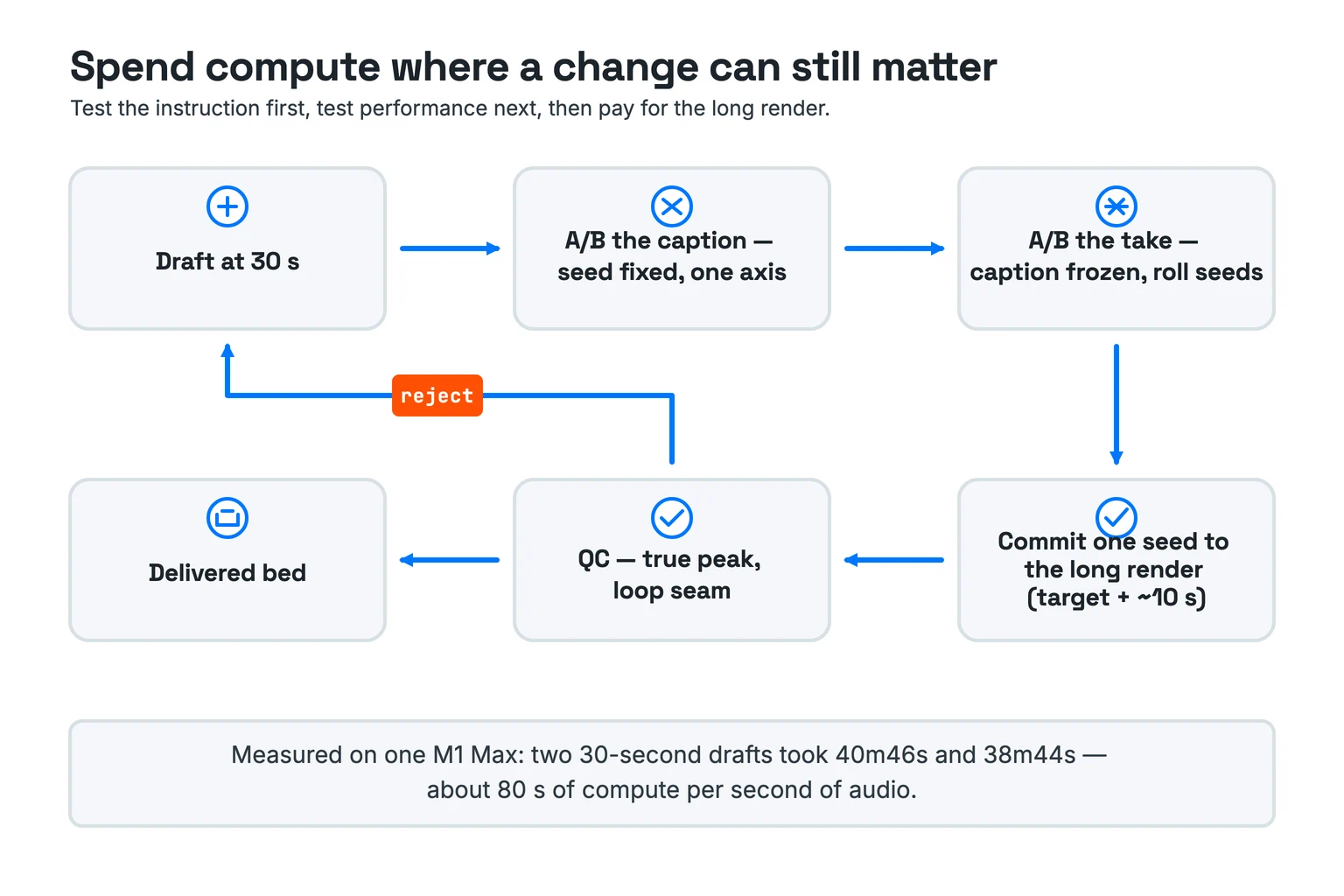
The loop includes a real rejection path. Quality control checks the true peak and the loop seam before delivery, then sends a rejected bed back to the draft. That taste gate is separate from file completion. A reproducible render can still fail my own decision about whether the music belongs on the channel.
The researched workflow I should have used
The researched workflow is one chain: write a disciplined caption, test one variable, listen to soft targets, design the seam, and check the delivered level. A correct caption structure does not guarantee that I will like the result. The official announcement describes Structured Captions as temporal descriptions of emotion, instrumentation, vocals, and arrangement. My batch shows only that structural compliance and personal acceptance are different gates.
Write a three-part Structured Caption
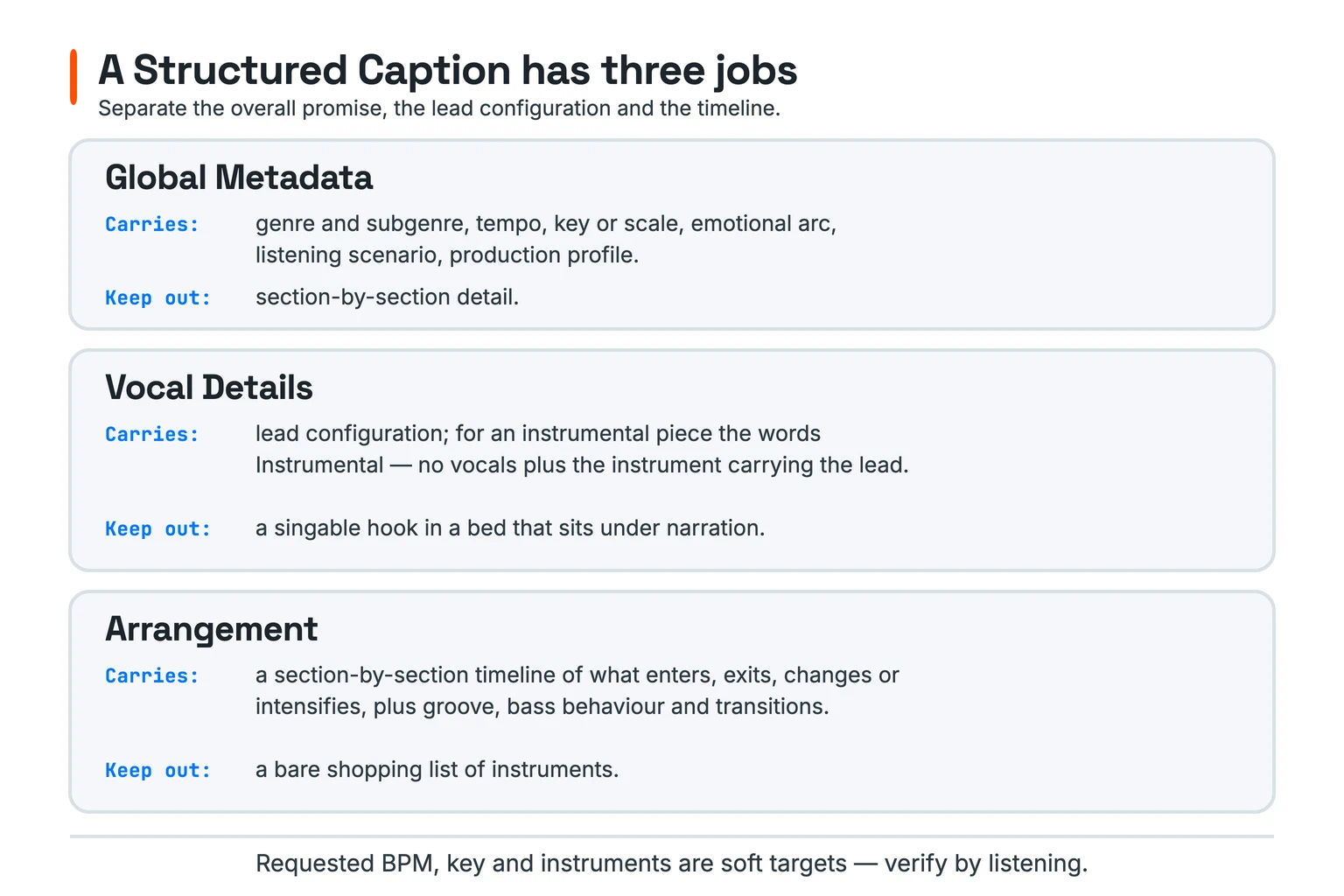
MiniMax’s model card recommends three sections for precise control: Global Metadata, Vocal Details, and Arrangement. Global Metadata carries genre, tempo, key, emotional arc, scenario, and production profile. Vocal Details specifies the lead configuration; an instrumental bed states Instrumental — no vocals and names the lead instrument. Arrangement describes when instruments enter, change, intensify, and leave across named sections.
Local practice targets roughly 250–450 English words. Below about 120 words, the model tended to free-associate; past about 600, it tended to ignore the tail. These are local observations, while the model card supplies the official 5,000-token ceiling. The official MiniMax prompt guide recommends naming two or three instruments precisely and leaving the rest to the model. Local caption practice then gives every named instrument a lifecycle rather than leaving a flat shopping list.
Separate soft targets from executable instructions
Requested BPM, key, instruments, and structure are soft targets. The model card says they provide generative control, not strict symbolic guarantees, so each needs a listening check. Section tags are the executable structural instructions in the local workflow. The supported tag set includes [Intro], [Verse], [Pre-Chorus], [Chorus], [Post-Chorus], [Bridge], [Instrumental], [Solo], and [Outro].
For an instrumental bed, the local skeleton is [Intro], [Instrumental], and [Outro]. Arrangement should name those sections so the caption and structural skeleton agree. A stray [Chorus] invited singing in local practice. That is an observed workflow warning, not a promise about every generated take.
Configure the ComfyUI node graph deliberately
The official ComfyUI tutorial describes max_duration as the target length and says the model supports about 300 seconds. Its shipped workflow template contains a discrepancy: the live widget is 60, while its own note says the default is 120. Neither value should be presented as one unqualified official default. Generation can also stop before the ceiling when the model emits an end-of-audio token.
A fixed seed reproduces the same song, while a changed seed produces another take, according to the tutorial. My local script used cfg_scale 1.7 and top_k 50, but the official tutorial and template do not explain those widgets’ semantics. I can record those local defaults without inventing official meanings. That makes one-variable tests more honest than simultaneous knob changes.
Tiled VAE decode reduces memory use, but the tutorial notes slower decoding and a small seam risk. It recommends disabling tiled decode on high-VRAM GPUs for best quality. This M1 Max workflow used tiles of 1536 with 64 overlap as its local memory-saving default. On Apple silicon, this setup used the fp16 DiT and pruned bf16 encoder; the local evidence warns that the CUDA-oriented int8_convrot variants should not be used on MPS.
Design narration beds and loops before delivery
A narration bed needs room for speech before mixing begins. Local guidance keeps 200 Hz–4 kHz sparse, removes the melodic hook, holds a flat emotional arc, and avoids risers, impacts, or gated-snare fills. The library rule is to audition each bed under actual narration rather than in isolation. How Instagram Reel scripts change across English, Portuguese, and Japanese provides the adjacent spoken-video context for that use.
A loop needs arrangement work before crossfading. The caption should end where the arrangement began. Then crossfade the tail into the head and listen across the seam twice. If the endpoints occupy different harmonic places, the local procedure treats the caption as the problem rather than extending the crossfade.
Check true peak before delivery
Fifteen of the 17 raw takes measured above 0 dBTP, with the loudest at +1.130 dBTP; yt-rock-opener measured exactly 0.000 dBTP, while ig-rock-launch measured −0.310 dBTP. Sixteen delivered files were attenuated to −1.200 dBTP; yt-boombap-city-night was attenuated to −1.400 dBTP. Those measurements describe only these files, not a general property of MiniMax Music 3.
The local release-master guidance targets about −14 LUFS integrated and a true peak at or below −1 dBTP. That is a workstation practice, not an official MiniMax or platform requirement. The important sequence is to measure, apply the intended level control, and verify the result before delivery.
What I think went wrong—and what I will change next
My interpretation is narrow: the process verified files and preserved inputs, but it did not place my taste decision early enough. Every caption had the required three sections, an instrumental Vocal Details block, and a timed Arrangement. Yet my own judgment is that the resulting tracks are not good enough to keep. A completed file and a personally accepted bed are different outcomes.
My interpretation of the long, prescriptive captions
The captions were also long and highly prescriptive. For example, ig-rock-launch dictated six timed sections and explicitly prohibited risers, impacts, gated-snare fills, crash-led transitions, and tom flourishes. I interpret that density as one place to test, not as a demonstrated cause of my verdict. This batch does not prove that detailed captions generally produce music someone will reject.
The next useful distinction is caption quality versus take quality. A fixed seed lets me compare one caption change against the same underlying take conditions. Once the caption survives that test, rolling seeds compares performances without rewriting the brief. Listening supplies the taste gate that structure and reproducibility cannot supply.
Second attempt: test one variable before a long render
I am going to make a second attempt soon. I will begin with one 30-second draft, hold the seed fixed, and change one caption axis. After freezing that caption, I will roll two or three seeds and choose by listening. Only then will I commit one seed to a long render with the intended duration plus about ten seconds.
The second attempt is a stated intention, not a promised result or schedule. Its purpose is to make each comparison interpretable. It does not assume that the next 17 tracks will pass my taste test.
Sources
- MiniMax-Music3 model card — Structured Caption sections, section tags, prompt ceiling, and soft-target limits.
- MiniMax Music 3.0 official announcement — the temporal role of captions and arrangements.
- Official MiniMax-Music3 repository — model workflow and caption-rewriter reference.
- Official ComfyUI MiniMax Music 3 tutorial — node graph, duration, seed, and tiled-decode guidance.
- Official ComfyUI workflow template — live widget values and embedded parameter note.
- Official MiniMax music-generation prompt guide — instrument selection and prompt craft.
- MiniMax-Music3 COMMUNITY LICENSE — public machine-generation disclosure duty.
- First-party repository sources:
content/bgm-library/ledger.tsv,content/bgm-library/README.md,content/bgm-library/LICENSE-NOTICE.md, and each track’scaption.txt. - Local operating references:
minimax-music/references/prompting.md,bgm-for-video.md,local-inference.md, andspotify-release.md.
Apply the five-line caption check to one 30-second draft
- Write Global Metadata with genre, tempo, key, emotional arc, scenario, and production profile.
- Write Vocal Details, or state
Instrumental — no vocalsand name the lead instrument. - Bind Arrangement changes to the section tags used by the generation input.
- Name two or three instruments precisely, and give each one a lifecycle.
- Listen for the requested soft targets before committing the selected seed to a long render.